Every photo has a story, but blur, noise, poor lighting, and low resolution often keep that story from looking its best. Photo Enhancer is a web-based AI photo enhancement tool built for creators, sellers, and everyday users who need cleaner, sharper images without learning professional editing software.
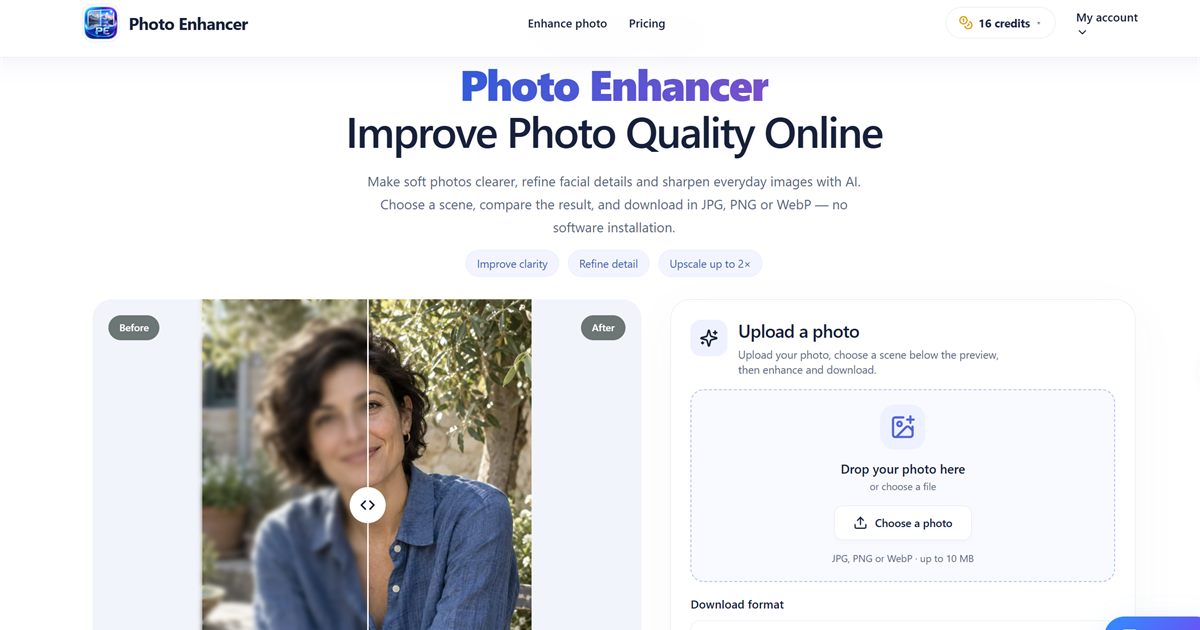
At its core, Photo Enhancer uses AI-driven image processing to improve clarity, detail, and overall visual quality in a few clicks. Instead of manually adjusting sharpness, contrast, denoise, and lighting across multiple sliders, users upload a photo, choose enhancement settings, and let the model produce a refined result. The platform is designed around a simple before-and-after workflow: you can see what changed, judge whether the output meets your needs, and download the enhanced image. It is especially useful for portraits, product photos, social media posts, landscapes, pet photos, and images containing text, where clarity and legibility matter. The service runs in the browser, so there is no complex installation or steep learning curve, and a free daily enhancement makes it easy to test the tool on real photos before committing to a paid plan.
Key Features
-
AI-Powered Enhancement: Improve sharpness, detail, and overall image clarity with AI rather than manual retouching. The model analyzes the photo and applies enhancements intended to make everyday images look cleaner and more professional.
-
Before/After Comparison: Use an interactive comparison view to evaluate the original and enhanced versions side by side. This makes it easy to confirm that details, edges, and textures improved without unwanted artifacts.
-
Customizable Enhancement Settings: Adjust settings to match the photo type and desired output. Whether you want a subtle cleanup for a portrait or stronger clarity for a product shot, the controls help you avoid a one-size-fits-all result.
-
Support for Common Image Types and Use Cases: Enhance portraits, product images, landscapes, pet photos, social media graphics, and photos of text or notes. The tool is designed for varied real-world images, not only studio-quality source files.
-
Output Size and Preview Checks: Review the enhanced result and check the output size before downloading. This helps ensure the final file is suitable for web uploads, social sharing, client previews, or print use.
-
Free Daily Enhancement: Try the core enhancement workflow without paying upfront. The free daily allowance lets you test the AI on your own images and compare quality before choosing a premium option.
Get Started
Getting started with Photo Enhancer is straightforward. Open the website in a modern browser, upload the photo you want to improve, and choose the settings that fit your use case. The interface guides you through selecting a photo, configuring the enhancement, and viewing the result. After processing, use the comparison view to inspect the before-and-after difference, check the output details, and download the enhanced image if it meets your standards. Because the tool is web-based, it works across desktop and mobile browsers without requiring a dedicated app. For best results, start with the highest-quality source image available; AI enhancement can improve clarity and detail, but it cannot recover information that was never captured. It is not a full replacement for professional retouching, compositing, or advanced color grading, but it is a practical first step for making photos clearer, sharper, and more presentable. If you regularly publish product listings, social posts, client previews, or personal photos, Photo Enhancer offers a focused workflow that removes much of the friction from image cleanup.