CtrlOps is an AI-powered server management and DevOps tool built for practical infrastructure work. It connects directly to your servers over SSH no agents to install, no mandatory cloud relay, and no lock-in. Because the app runs locally, sensitive keys and credentials stay on your machine.
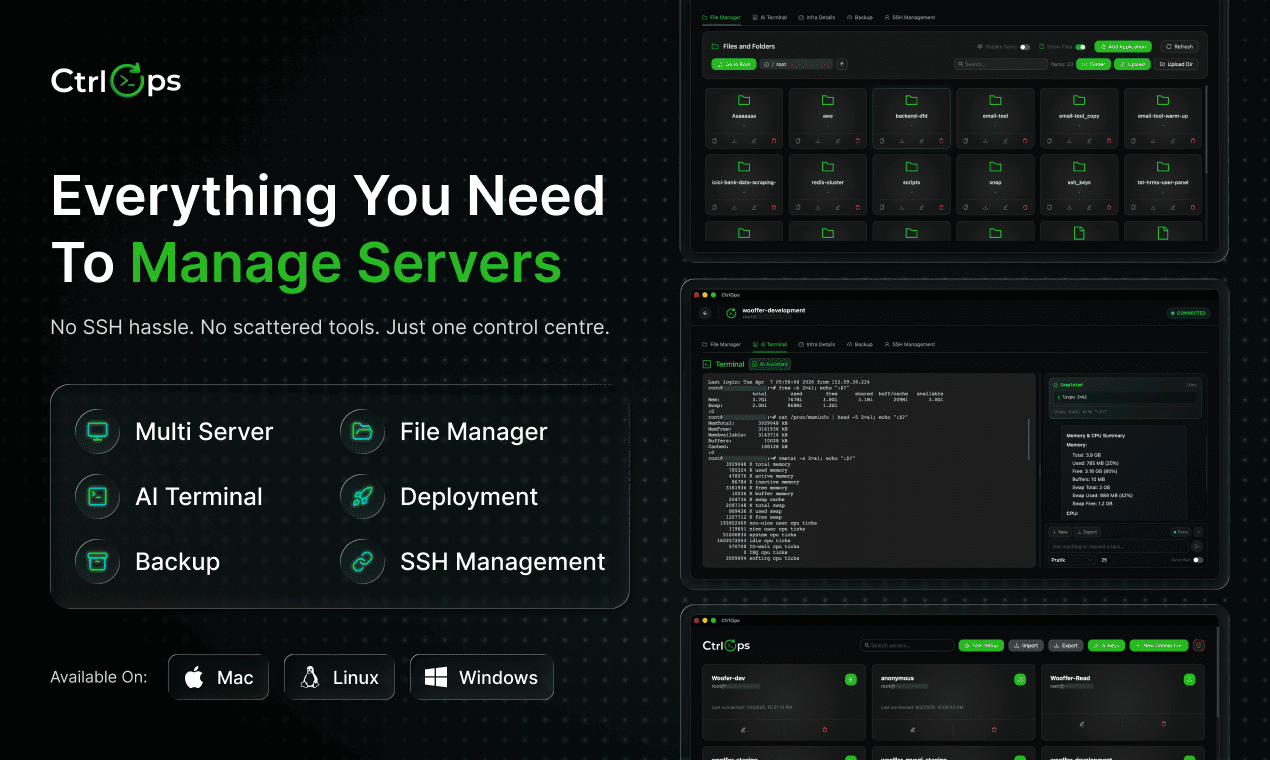
The platform unifies an AI-assisted terminal, Security audit, real-time monitoring, one-click deployment, a built-in file manager, and backup workflows into one interface. Whether you are managing a single VPS or a fleet of instances across multiple providers, CtrlOps gives you a consistent way to operate your infrastructure without bouncing between tools.
Key Features
AI-assisted terminal: Interact with your server conversationally. CtrlOps can help construct shell commands, explain output, inspect logs, and guide you through debugging sessions. It is like having a DevOps-savvy assistant inside your terminal.
One-click deployment: Deploy applications and configuration updates to one server or many servers at once. CtrlOps streamlines repetitive deployment tasks, making releases faster and less error-prone.
Real-time monitoring and analytics: Track CPU, memory, disk, network, and service health in real time. The dashboards give you immediate visibility into server performance, so you can spot anomalies before they become outages.
Built-in file manager: Browse, edit, upload, and download files directly from the app. No need for a separate SFTP client when you need to tweak a config file or move assets.
Automated backups: Create and manage backup workflows for critical directories and databases, reducing the risk of data loss and making disaster recovery easier.
Get Started
Download the desktop app, add your SSH credentials or connect a cloud provider account, and CtrlOps will discover servers you can manage. The free tier lets you start managing servers without upfront cost, and premium plans add advanced automation, team features, and higher-scale operations.
Documentation and embedded guidance help new users get comfortable quickly, while the AI assistant shortens the learning curve for less familiar commands and workflows.