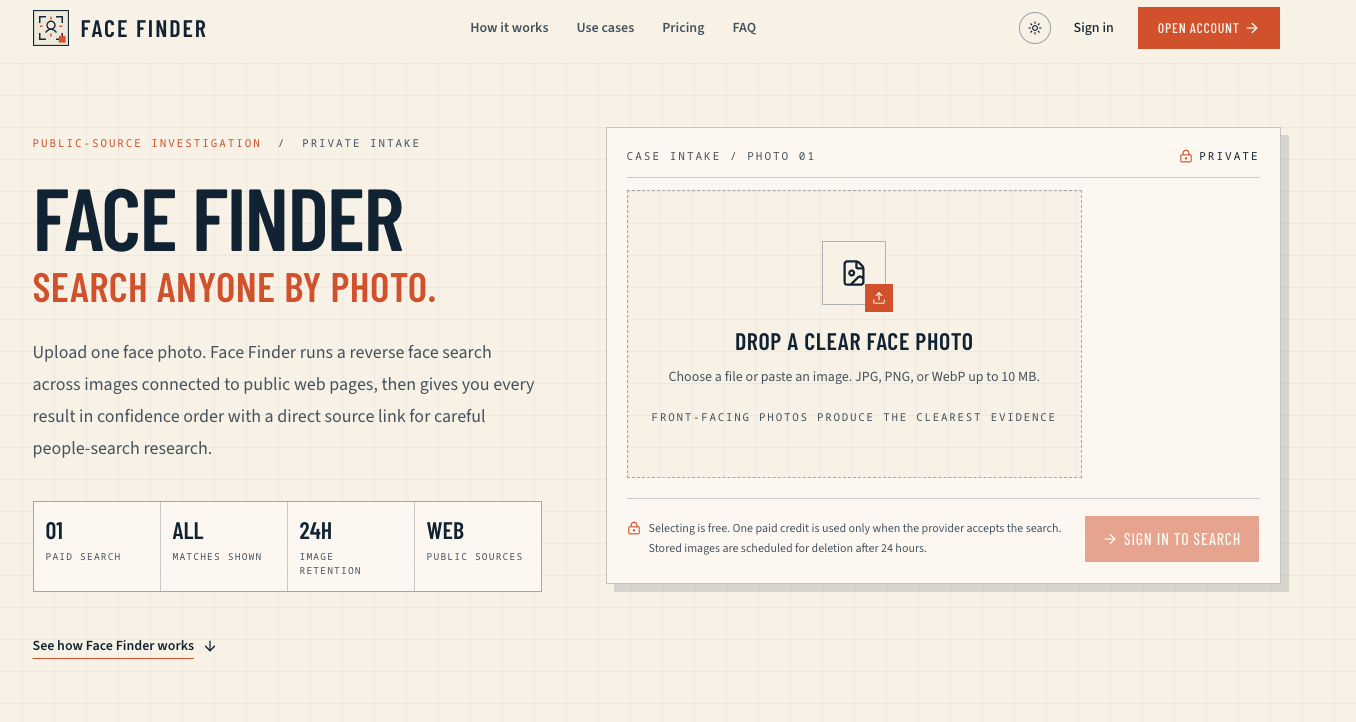
Ever come across a photo and wondered, "Who is that?" Whether it's a profile picture from a dating app, a screenshot from a video, or an old image with an unknown person, identifying faces quickly and reliably is a challenge. Face Finder solves this problem by offering a powerful reverse face search engine that turns any photo into a lead. By leveraging advanced AI-driven facial recognition, the tool compares your uploaded image against a vast index of publicly available sources to surface visual matches—ranked by confidence—so you can verify identities, reconnect with lost contacts, or conduct safer people-search research.
Core Value Proposition
Face Finder uses state-of-the-art computer vision to extract unique facial features from your photo and cross-reference them across the web. Unlike text-based search, which relies on names or metadata, Face Finder works purely on visual similarity. This makes it invaluable for situations where you have an image but no other identifying information. The results are presented in a clear, confidence-ordered list, with each match linked back to its original source (social media profiles, news articles, public records, etc.). This approach prioritizes accuracy and transparency, helping you make informed judgments about the reliability of each hit. Whether you're a journalist verifying a source, a recruiter checking a candidate's online presence, or simply trying to put a name to a face, Face Finder provides a fast, privacy-respecting path to answers.
Key Features
- Reverse Face Search: Upload any photo—selfie, group shot, or cropped face—and let the AI find visually similar faces across indexed public sources. The engine works with partial or low-resolution images, maximizing the chance of a match.
- Confidence-Ordered Results: Results are ranked by a confidence score, showing the most likely matches first. Each entry includes the source URL and a thumbnail, so you can quickly assess relevance without clicking through.
- Source-Linked Visual Matches: Every match is accompanied by a link to the original webpage where the similar face appeared. This transparency allows you to verify the context and authenticity of the match, reducing the risk of false positives.
- Privacy-Focused Design: Face Finder does not store your uploaded images longer than necessary for processing. The service is designed to be used responsibly—no automatic social media tagging, no permanent database of searches. You maintain control over your queries.
- User-Friendly Interface: No technical expertise required. Simply drag and drop an image or paste a URL, and within seconds you receive a visual results dashboard. The clean, minimalist design ensures you focus on the data.
- Fast Processing: Search results typically appear in under 30 seconds, thanks to an optimized backend and efficient indexing. This speed is critical when time-sensitive investigations or verifications are needed.
- Freemium Access: Start for free with a limited number of searches. Upgrade to premium for higher quotas, priority processing, and bulk search capabilities. The free tier lets you test the accuracy before committing.
Get Started
Using Face Finder is straightforward. Visit the website, upload an image (JPG, PNG, or WEBP) directly from your device or provide a public URL. The system automatically detects faces and initiates a search. No account creation is required for basic use—just drag and drop. For regular users, creating a free account allows you to track your search history and manage premium upgrades. The interface is intuitive; you'll have your first set of results within seconds. For best results, use clear, front-facing photos with good lighting. While Face Finder can work with partial images, higher quality inputs yield more accurate matches. Documentation and FAQ sections on the site provide tips on maximizing search accuracy and understanding the confidence scoring system.